3D Clash Coordination

Home

3D Clash Coordination

ABOUT THE SERVICE

Catching trade conflicts before they reach the site

Clash coordination is how we catch and resolve conflicts between trades early in the BIM process, before they turn into problems in the field.

We check that both the individual trade models and the combined federated model are properly organized and free of conflicts, handling the detailed adjustments that come after modeling is done.

Getting this right protects the two things that matter most on a project: budget and schedule.

Built on real BIM data

Service Benefits

What clash coordination protects on your project

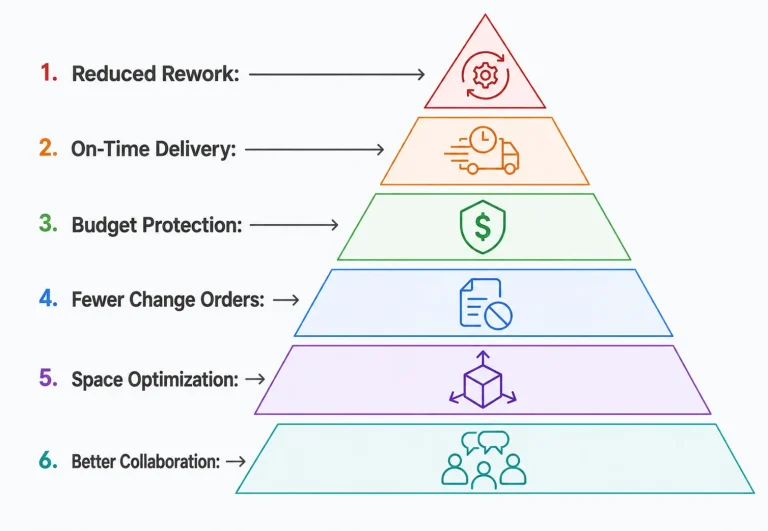
✓ Limits rework by catching conflicts before they reach the field.

✓ Keeps projects running on schedule, or ahead of it.

✓ Protects your budget by avoiding costly on-site surprises.

✓ Cuts down on change orders through effective upfront coordination.

✓ Makes better use of built-up areas by resolving space conflicts early.

✓ Improves collaboration between architects, engineers, and contractors through a shared review process.
Benefits of 3D Clash Coordination

Why Choose Us

A coordination process built around real trade conflicts

Service Process

How we move from model to clash-free coordination


1

Model Collection

We gather individual trade models from each discipline involved in the project.

1

2

Federated Model Assembly

Trade models are combined into a single federated model for review.

2

3

Clash Detection

The federated model is run through clash detection software to flag hard and soft clashes.

3

4

Issue Review & Resolution

Flagged clashes are reviewed with trade teams and resolved through coordinated adjustments.

4

5

Updated Model Delivery

The coordinated, clash-free model is delivered, ready for fabrication or construction.

5

Services Category

Our 3D Clash Coordination services include

Hard Clash Detection

Identifies physical overlaps between building elements and systems before construction

Soft Clash Detection

Flags clearance and access issues that could affect installation or maintenance.

Federated Model Coordination

Combines trade models into one unified model for cross-discipline conflict checks.
 

MEP Trade Coordination

Aligns mechanical, electrical, plumbing, and fire protection systems across the coordinated model.

Navisworks Clash Review

Detailed clash analysis and reporting run through Navisworks for accurate issue tracking.

CDE-Based Collaboration

Coordination managed within your project's Common Data Environment for centralized model access.

Renovation & Retrofit Coordination

Checks new systems against existing conditions to keep retrofit integration clean.

Milestone Clash Audits

Scheduled clash checks run at key design milestones and after model updates.


Issue Tracking & Resolution

Ongoing tracking and resolution of flagged clashes through to final sign-off.

Answers that build clarity

What is 3D clash coordination in BIM?

It's the process of checking a federated BIM model for conflicts between different trades and resolving them before construction starts, which helps avoid expensive rework later.

How do clash detection services help my project?

They catch spatial conflicts across architectural, structural, and MEP systems early, which cuts down on delays, prevents rework, and keeps the project running more efficiently overall.

What software do you use for clash coordination?

We rely on tools like Navisworks and Revit, along with other BIM platforms, to run accurate clash checks, track issues, and keep everyone on the project working from the same information.

Does clash coordination help teams collaborate better?

It does, mainly by giving architects, engineers, and contractors one shared model to review together, which makes it easier to talk through conflicts and agree on fixes instead of working from separate assumptions.

Is clash coordination useful for renovation or retrofit projects?

Definitely — it's actually one of the more important use cases, since it helps flag where new systems might conflict with what's already in place, keeping the integration clean.

Is clash coordination only useful for large projects?

Not at all — it helps projects of any size, and it's especially valuable when a project involves several trades, complicated MEP layouts, or tight design tolerances.

What kinds of clashes can you detect?

We look for hard clashes, where objects physically overlap, as well as soft clashes, which are clearance problems. Both matter, and catching them early heads off bigger issues down the line.

Can clash coordination actually reduce construction costs?

Yes — catching design conflicts early means fewer change orders, less wasted material, and a project that moves faster overall, all of which show up as real cost savings.

How often should clash detection be run?

Ideally at every major design milestone and after any model update, so coordination stays current instead of going stale between revisions.

What's the difference between hard and soft clashes?

A hard clash is a straightforward physical overlap, like a beam running through a duct. A soft clash is more about clearance — say, not enough room around a piece of equipment — and both need attention for a project to go smoothly.

Ready to see your project rendered?

Share your BIM model or drawings — we'll turn them into visuals your stakeholders can approve on sight.