Bill Of Materials (BOM)

Home

Bill Of Materials (BOM)

Time has changed

Your project's ingredient list, pulled straight from the model

A bill of materials is one of the most practical outputs of the BIM process — think of it as an ingredients list, spelling out every component your project actually needs to get built.

We develop BOMs using modern tools like Revit, so the part numbers, quantities, and specs stay tied to the real model instead of a manually assembled spreadsheet.

Done well, a BOM does more than list parts — it keeps ordering accurately, resources planned, and pre-construction moving without surprises.

Built on your project data

Service Benefits

What an accurate BOM changes before construction starts

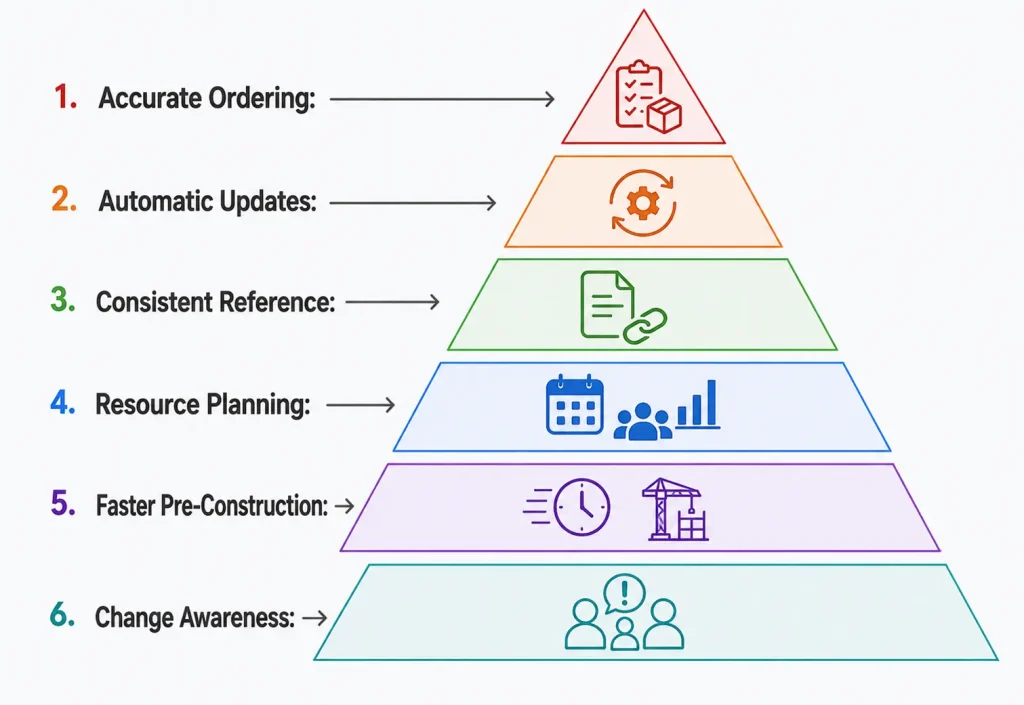
Makes ordering more accurate and cuts down on wasted material.

Stays current automatically as design changes come through the model.

Gives project teams a consistent, model-based reference instead of scattered spreadsheets.

Supports better resource planning and more consistent product standards.

Speeds up pre-construction by giving procurement a clear, ready-to-use list.

Keeps everyone aware of what’s changed and when.
BIM Bill of Materials Benefits

Why Choose Us

A BOM process built around accuracy, not guesswork

Service Process

From model to procurement-ready BOM


1

Model & Data Review

We start from the coordinated BIM model and confirm scope and material categories.

1

2

Quantity Extraction

Part numbers, quantities, and units of measurement are pulled directly from the model.

2

3

Specification & Rate Detailing

Descriptions, specs, and scheduled rates are added for cost planning.

3

4

Verification

Extracted data is manually checked against the model for accuracy.

4

5

Delivery & Updates

The finished BOM is delivered, with updates made as design changes come through.

5

6

Final Delivery& Visualization

Deliver approved renderings and animation assets.

6

Services Category

Our Bill of Materials services include

MEPF Bill of Materials

Detailed material lists for mechanical, electrical, plumbing, and fire protection systems.

Pipework & Fabrication BOMs

Accurate part lists supporting pipe fabrication and installation.

Material Takeoffs

Precise quantity extraction pulled directly from the coordinated BIM model.
 

Permit-Ready BOM Documentation

BOMs formatted to meet local authority requirements for approvals.

Revit-Based BOM Extraction

Model-driven BOM data extracted directly from Revit for accuracy.

Residential BOM Services

Tailored bills of materials built for residential-scale projects.

Commercial BOM Services

 Comprehensive BOMs scaled for commercial and large-format projects.

BOM Revision Management

Ongoing updates to the BOM as design or material changes occur.


Cost & Rate Scheduling

Scheduled rates and pricing added to support cost planning and budgeting.

Answers that build clarity

What is a Bill of Material (BOM) in construction?

A BOM is a detailed list of every material, quantity, and spec needed to complete a project — a structured breakdown that helps teams plan, budget, and execute without guesswork.

How do BIM Bill of Materials services work?

We pull data straight from the BIM model, which gives accurate itemized tracking and quantity calculations that plug directly into the rest of the construction workflow, cutting down on manual errors.

Can I use BOM documents for building permit approvals?

Yes — we format them to match local authority requirements, which helps speed up approvals and keeps things compliant.

Who benefits most from BOM services?

Architects, engineers, contractors, and other AEC professionals, mainly for procurement, budgeting, compliance, and approvals — it's a document a lot of different roles end up relying on.

How does a BOM help with project budgeting and cost control?

It gives project managers accurate quantities and costs to build a realistic budget from, which makes it easier to catch overspending early and spot where costs can be trimmed.

What's included in a standard BOM report?

Material quantities, specs, unit prices, supplier details, and reference drawings — enough to support both cost planning and procurement decisions.

Is your BOM service compatible with Revit models?

Yes, fully. That compatibility is what keeps data moving smoothly between design and construction instead of getting re-entered by hand at every stage.

How accurate are your material takeoffs?

They're model-driven and then manually verified, whether we're working from 2D drawings or 3D BIM files, so the precision holds up for cost and resource planning.

How can BOM services help with material procurement?

By giving procurement a clear, comprehensive list of what's needed, so the right quantities get ordered at the right time instead of dealing with shortages or overstock.

How do you manage changes in the BOM during a project?

We keep the BOM updated as design or material changes happen, so revisions get captured right away and procurement and scheduling stay aligned with where the project actually is.

Ready to see your project rendered?

Share your BIM model or drawings — we'll turn them into visuals your stakeholders can approve on sight.